



Effective products guide users seamlessly through tasks like signing in, purchasing, or adjusting settings. However, functionality doesn't guarantee ease of use and usability issues are often discovered once the end users interact with the product. Designers and engineers know the product they build but customers lack this insider context. Unclear labels or hidden gestures easily can easily confuse new users. Testing with unfamiliar users reveals whether software is truly intuitive. When users get stuck, they hesitate, abandon tasks, or switch to competitors. Usability testing observes target users completing realistic tasks to pinpoint where they struggle, helping teams fix issues. In this post we try to cover the various aspects and benefits of usability testing,
What Is Usability Testing?
Usability testing measures how easily people can complete a task with a product, though it measures more than ease of success. The time it takes, errors made along the way, and user satisfaction help provide a full picture of their experience. To make those findings useful, testers need to understand what users did and why they did it.
Testers gather both quantitative and qualitative findings, each revealing something different about the user experience. Quantitative data show how often people complete a task, how long it takes, and how many errors occur. Qualitative findings help explain why users struggle or succeed. For example, someone might finish a task in two minutes, yet spend half that time wondering whether a change was saved. Both findings are useful. Together, they help teams identify problems, prioritize improvements, and measure progress.
The Five Pillars of Usability
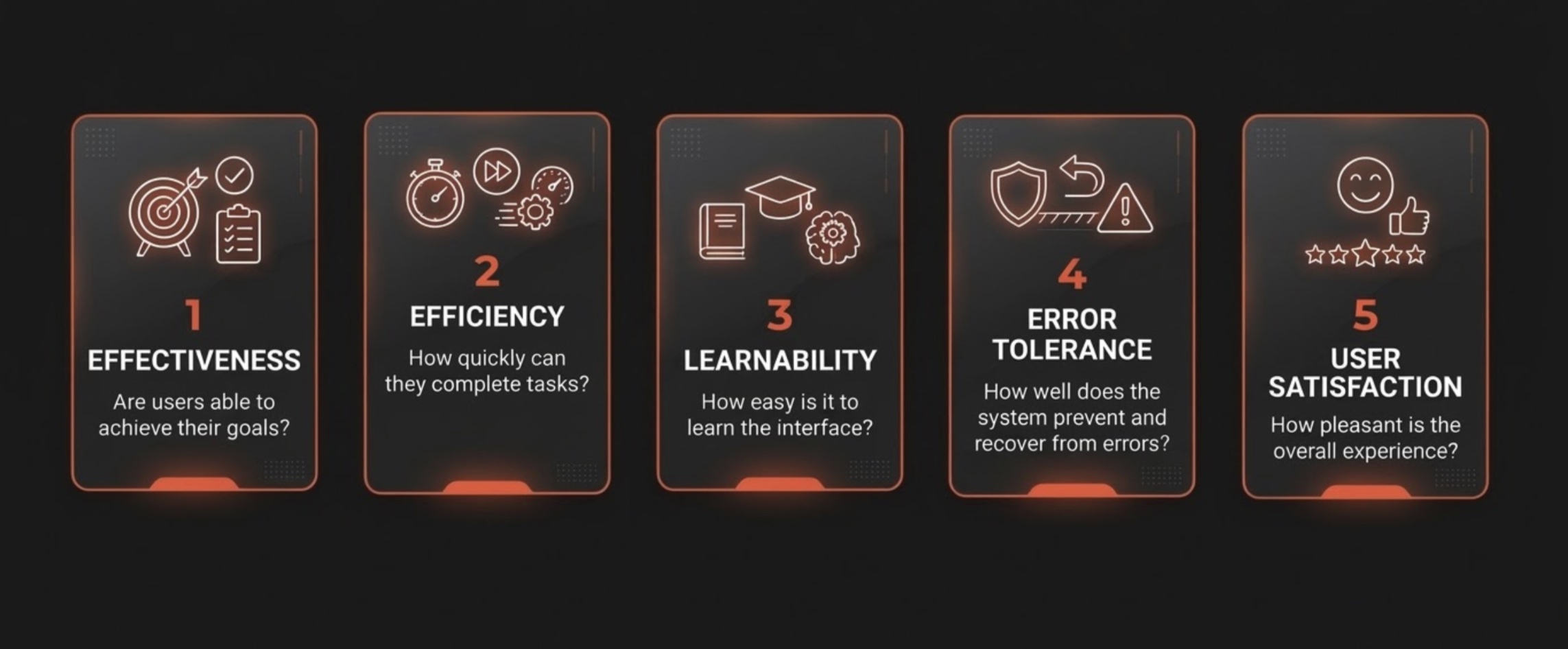
Five pillars of usability testing help teams evaluate different aspects of the user experience.
- Effectiveness measures whether users can accomplish their intended goals. Can they find the information they need, submit a form, or complete a transaction successfully?
- Efficiency considers the time and effort required to complete a task. Extra clicks, repeated searches, and unnecessary steps can make even a successful interaction more difficult than it needs to be.
- Learnability measures how quickly people understand how to use a product. Clear labels, familiar patterns, and logical organization help new users get started without extensive instruction.
- Error tolerance examines how easily people can recognize and recover from mistakes. Helpful error messages, clear recovery options, and forms that preserve previously entered information can keep a small mistake from forcing someone to start over.
- User satisfaction captures how people feel about using the product. Their confidence, comfort, and perceived ease of use help teams understand the experience beyond task completion and other performance metrics.
Benefits of Usability Testing for Businesses
A frustrating checkout can cost you. Losses begin to add up quickly when your expensive ad campaign draws in thousands of potential customers who run into the same problem. Your competition will be thankful you’ve overlooked what could be an easy fix. The Baymard Institute estimates that the average large e-commerce site could improve checkout conversion rates by up to 35% through design changes alone.
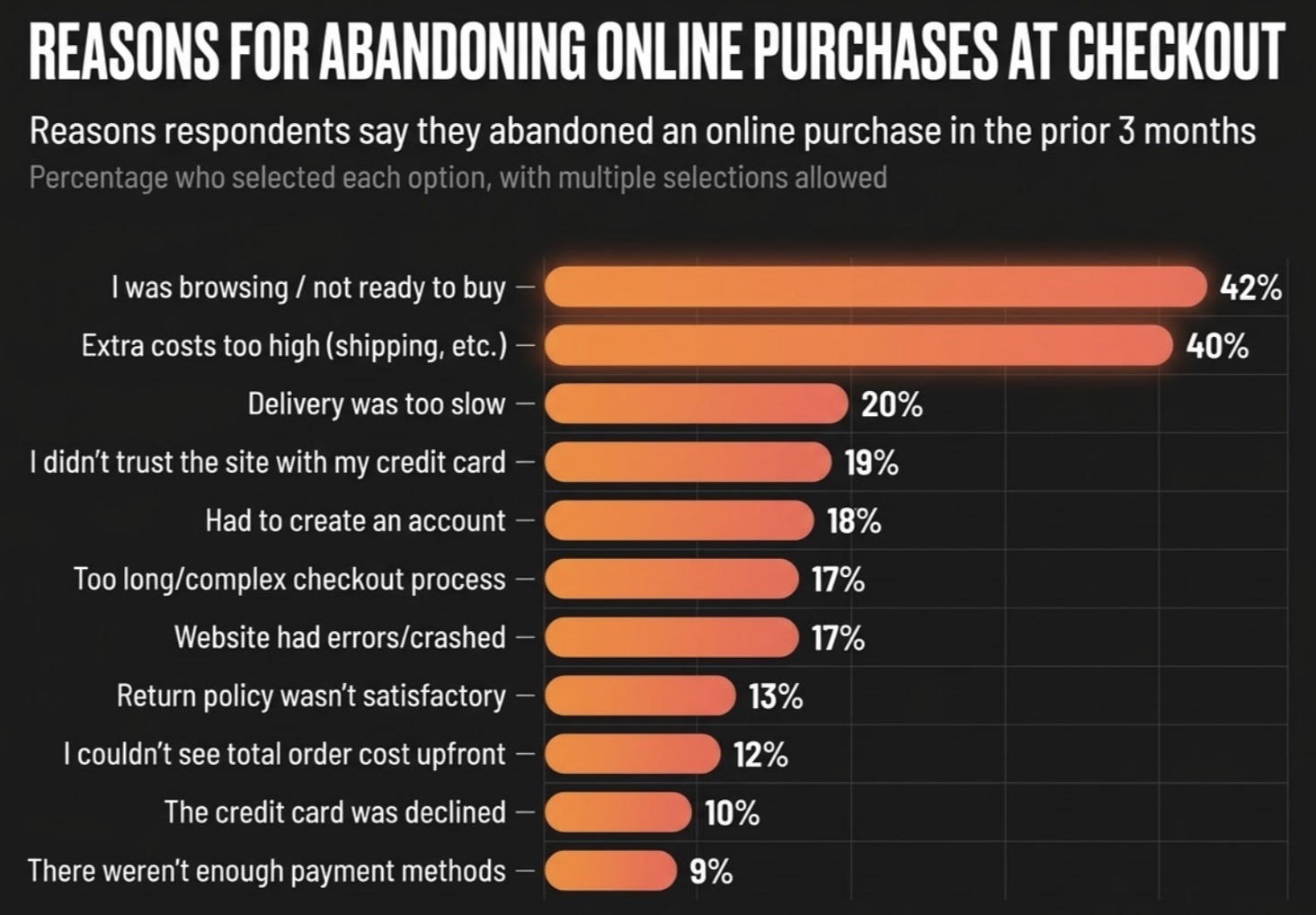
The consequences extend beyond a lost sale. Customers who repeatedly struggle with a product may stop using it, contact support for help, or lose confidence in the company behind it. Even customers who stick around may be reluctant to recommend the product to others. Usability testing helps teams identify the problems behind those decisions. Addressing them can improve customer satisfaction, retention, and loyalty while reducing avoidable support costs.
Usability testing works alongside several other forms of QA and research. Each examines a different aspect of product quality, and understanding those distinctions helps teams choose the right approach.
- Functional testing verifies whether software features work according to requirements. Usability testing evaluates how easily people can use those features.
- User acceptance testing (UAT) determines whether software meets agreed business requirements and acceptance criteria. Usability testing focuses on people's experiences using it.
- UI testing checks whether interface elements display and function correctly. Usability testing examines whether people understand how to interact with them.
- Beta testing puts near-finished software in the hands of users before release to identify a range of potential issues, including bugs, performance problems, and usability concerns.
- UX research explores people's needs, expectations, and experiences with a product. Usability testing is one method within this broader discipline.
- A/B testing compares versions of a product to determine which produces better results. Usability testing can help explain why people respond differently to each version.
Accessibility testing deserves particular attention because it shares several goals with usability testing. Both help teams understand whether people can successfully use a product, while accessibility evaluation also addresses technical conformance with standards such as WCAG. Usability sessions utilizing testers with disabilities can identify barriers that automated checks and standards-based evaluations may miss. The W3C recommends combining user evaluation with conformance testing to assess accessibility more thoroughly.
When to Perform Usability Testing
Usability testing can begin before developers write a single line of code and continue long after a product launches. What teams need to learn changes throughout development. Early testing helps determine whether people understand a concept, while later testing examines how they use working software and where improvements are needed.
Usability Testing Throughout the Development Lifecycle

Discovery and Concepts
Does the idea make sense to the intended audience?
Early concepts and sketches help teams learn whether users understand a proposed design and its purpose before investing in development.

Design and Prototyping
Can people figure out how to use it?
Wireframes and interactive prototypes let teams evaluate navigation, labels, layouts, and essential interactions while changes are relatively easy to make.
Development
Can people accomplish what they need?
MVPs, functional prototypes, new features, and redesigned experiences give testers working software to evaluate. Teams can examine complete user journeys and identify obstacles before release.

Pre-Release and Beta Testing
Is the product ready for its intended users?
Testing focuses on critical user journeys across supported devices and environments. Beta testing expands the participant pool and reveals problems that may not have appeared in earlier sessions.

Post-Launch Optimization
What can we improve next?
Analytics, customer feedback, and additional usability sessions help teams identify persistent issues, evaluate new features, and determine whether recent changes improved the experience.
Testing rarely follows a perfectly straight line. A problem discovered during beta may require another round of design work, while post-launch findings can shape the next prototype. Repeated testing gives teams opportunities to make changes while those findings are still useful.
Mobile vs. Desktop Usability Testing
A website that works well with a mouse and keyboard may be harder to navigate with a thumb. Mobile users contend with smaller screens, touch gestures, virtual keyboards, changing network conditions, and differences between devices and operating systems. Desktop testing introduces its own considerations, from larger displays to keyboard navigation and precise pointer interactions.
Testing on real devices helps teams examine how these differences affect the user experience. Screen dimensions, hardware performance, operating systems, and input methods can all influence what people encounter, making device selection an important part of planning a usability study.
Usability Testing Methods
No single usability testing method is best for every product. The right approach depends on what the team needs to learn, who's participating, and the stage of development. A team investigating abandoned checkouts might observe where shoppers get stuck or give up, then work with other participants to understand why they're struggling.
Moderated vs. Unmoderated Usability Testing
In moderated usability testing, a facilitator leads the session, observes participants as they use the product, and asks follow-up questions to better understand their decisions. This approach is especially useful for complex features or workflows, where an unexpected action or hesitation may deserve further investigation. Unmoderated usability testing allows participants to complete predefined tasks independently, without a facilitator present. It works well for straightforward activities and can help teams gather feedback from more participants without coordinating individual session times.
Remote vs. In-Person Usability Testing
A participant testing an app at home may encounter different problems than someone using the same app in a controlled testing environment. Remote testing allows people to participate from different locations, often using their own devices and familiar surroundings. In-person testing gives researchers more control over the environment and a closer view of physical interactions. This can be valuable when evaluating kiosks, specialized equipment, or prototypes that require hands-on interaction. Both approaches can be moderated or unmoderated, depending on the research goals.

Other Approaches to Usability Research
Some approaches answer more specific questions about a product and its users.
- Guerrilla testing gathers quick feedback from readily available participants. It suits early design decisions, though participants may not represent your audience.
- Contextual inquiry combines observation and interviews in people’s usual environments, showing how routines and surroundings shape their use of a product.
- Comparative testing has participants evaluate two or more designs, revealing preferences and differences in task performance.
- Accessibility testing looks for barriers people with disabilities may face. Technical conformance checks work well alongside usability sessions with participants who use assistive technologies such as screen readers, magnification or voice control.
Teams can also combine methods and tools. Unmoderated comparative testing might show which design helps more users complete a task, while moderated sessions explain why participants struggled with the other. Screen recordings, session replay and surveys capture what happened and what participants thought, remote platforms support studies across locations, and heatmaps, click tracking and analytics reveal broader behavior patterns. The right mix depends on the decisions your team needs to make.
How to Plan and Run a Usability Test
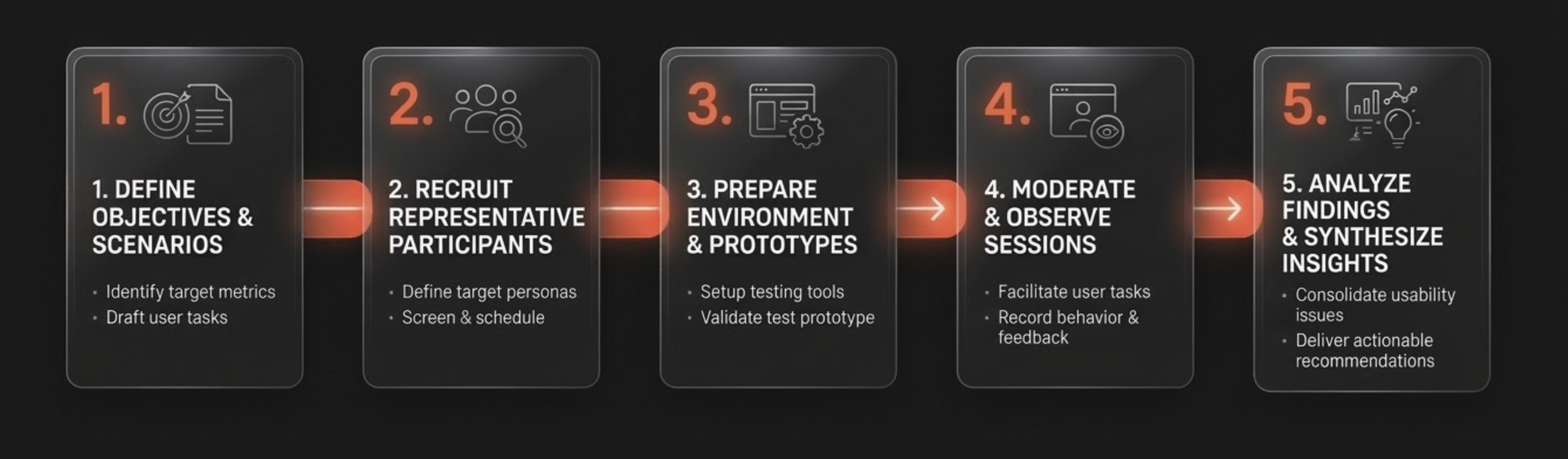
When customers abandon account registration, the team needs to find out where they stop and why. Are the instructions confusing, is the next step hard to find, or is something else getting in their way? Answering those questions requires a plan for who should participate, what they'll be asked to do, and how testers will evaluate the results. Here’s how it works:
- Define objectives: Identify what the team needs to learn and which product decisions the results should inform. Decide how you’ll measure it, including success criteria, performance metrics and the observations that will answer your research questions.
- Recruit participants: Choose people whose needs, experience and accessibility requirements reflect your intended audience. For customer-facing software, look beyond coworkers, whose familiarity with the product can hide problems that would confuse new users.
- Prepare environment: Create realistic scenarios and goals participants could encounter, then write neutral tasks that state a goal without saying which controls to use or which steps to follow. Pilot the instructions and setup beforehand to catch problems early.
- Moderate sessions: Run the sessions and observe participants as they work through the tasks, without leading them or hinting at the answers.
- Analyze findings: Identify recurring problems, rate their severity and consider how they affect different users. Prioritize the most consequential fixes, then retest to confirm the changes worked.
An effective test scenario gives participants a goal while leaving them free to figure out how to accomplish it. For example, ask someone to find a pair of running shoes they'd buy with a $100 budget. Telling them to use the search bar and apply a price filter would defeat part of the exercise. You'll learn by watching where they succeed, where they struggle, and what they try next. They'll do things you never considered.
How Many Participants Do You Need?
For qualitative research methods such as usability testing, GOV.UK typically recommends four to eight participants per round. The appropriate sample size depends on the research questions, the method, and the intended audience. Quantitative studies designed to compare performance or establish benchmarks generally require larger samples to produce statistically reliable results.
Who participates is as important as how many people participate. An experienced user might breeze through a feature that leaves a first-time customer wondering what to do next. Testing these groups separately can reveal problems that one group might never encounter. Smaller, repeated rounds give teams a chance to learn from the findings, make changes, and evaluate those improvements with new participants. The goal is to gather enough information to make sound product decisions, rather than reach a predetermined number of participants.
How QA and UX Teams Fix Usability Issues
When usability testing uncovers multiple issues, teams must prioritize which to fix first by evaluating their frequency, severity, and overall impact on the user experience. Leaving issues unresolved can lead to repeated errors, user frustration, and task abandonment.
At PLUS QA we have built a platform to gather participants and QA analysts feedback around the issues they find during testing. Feedback is generally articulated in tickets through screenshots, video recordings or detailed accessibility reports.
QA can verify that the feature works according to requirements, while UX researchers investigate why people miss the confirmation. Designers and developers can then make the confirmation more prominent and clearly identify the uploaded file, addressing a problem that might otherwise cost the company customers and support resources.
What's Changing in Usability Testing in 2026
AI already helps usability researchers analyze recordings, spot patterns and organize participant feedback, and researchers are now testing bigger roles for it. In a 2026 experiment at Hong Kong Polytechnic University, task performance did not differ significantly between AI and human moderators, although participants rated the humans more favorably, which suggests QA teams could reach more participants without putting a researcher in every session. AI is also learning to find usability problems: an agent from the University of Washington and Purdue University outperformed several general-purpose AI systems at assessing interfaces, but MeasuringU found that ChatGPT and Gemini caught legitimate issues in usability recordings while also missing problems that human researchers found and raising false alarms. Synthetic users look like a weaker substitute for real people, since Nielsen Norman Group found that AI-generated respondents gave far less varied answers than humans, so they may help generate test ideas but raise doubts about whether they can capture the unexpected behavior that makes human testing valuable. Finally, as AI agents browse websites and run into personal or payment details, a 2026 study led by Tsinghua University found that people want more control, so testers may increasingly need to check whether users understand what an agent can access and how to approve or block that access.
Better Products Start With Understanding Their Users
In the end, users decide whether a product is easy to use, not the people who built it. Functional QA verifies that software works as intended, while usability testing helps teams understand how well it works for the people using it. Together, they give developers, designers, and testers the information they need to improve the experience throughout development and long after launch.
PLUS QA helps companies put that knowledge to work through end-to-end usability testing. Our U.S.-based team recruits participants who reflect the intended audience, conducts moderated and unmoderated studies, and tests websites, mobile apps, prototypes, and other digital products across devices and environments. Clients receive quantitative results, participant observations, and actionable recommendations to guide their next steps.
Whether you're preparing to launch a new product, redesigning an existing feature, or trying to understand why customers struggle, PLUS QA can help. Contact our team to discuss a usability testing plan tailored to your software, audience, and goals.